Musicians and makers have long gravitated toward Arduino boards as a foundation for custom instruments. Over decades, the community has assembled theremins, MIDI controllers, and countless other sound-making devices from scratch, guided by a straightforward principle: if you want to play something, you ought to be able to construct it yourself. (The Queen guitarist Brian May, famously, built his own Red Special.)
When Arduino released the UNO R4, the creative experiments accelerated in tandem with the hardware's capabilities. Gustavo Silveira, a composer and self-identified "nerd musician", had already created his signature XT Synth—a hybrid instrument blending guitar, violin, and MIDI control—by absorbing knowledge from the maker community and contributing back to it. Tigris Li leveraged the UNO R4 to design a bespoke DJ controller. Clatters Machines, an Italian collective focused on crafting "noisy machines for music lovers", first prototyped their flagship product on an UNO and remained loyal to the platform ever since.
These examples are far from isolated. The Arduino Project Hub hosts a broad spectrum of instruments, effects processors, sequencers, and sound controllers built by people driven simply to hear something new. Synthesizers, in particular, dominate the catalog.
This pattern sparked two realizations. First, the UNO Q board opens fresh possibilities for musicians and artists—and Arduino is eager to witness what emerges. Second, why not streamline the process of assembling a functional synth, eliminating the friction of component selection and sensor wiring so that creative energy stays focused on sound design? The answer was the UNO Q DIY synth bundle.
Through November 30, 2026, the UNO Q DIY synth bundle carries a 35% discount on the Arduino Store as part of Black Friday promotions. For anyone considering their first instrument build—or shopping for a musically inclined maker—the timing aligns.
The bundle: everything you need to start, nothing to hold you back
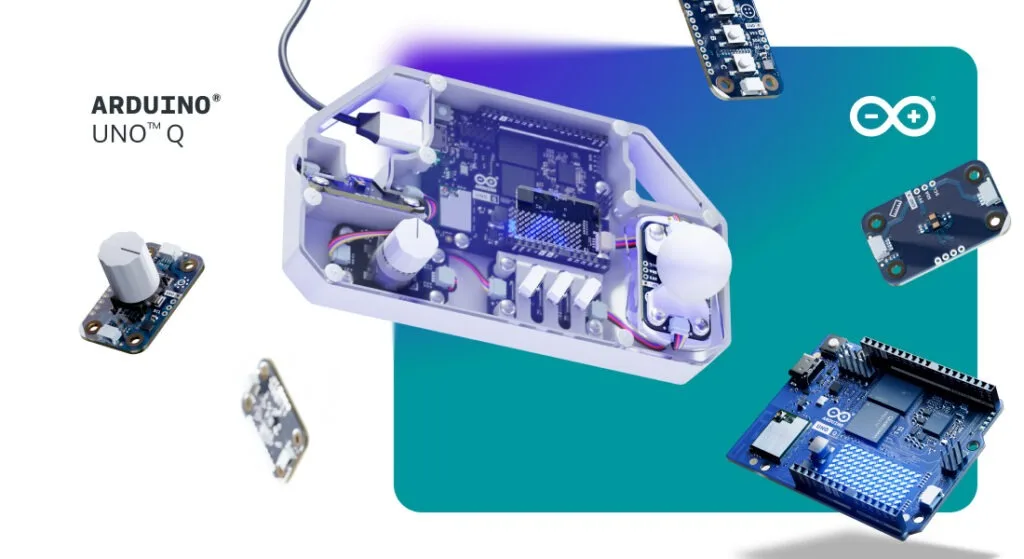
Inside the bundle sits a UNO Q 4GB board paired with four Arduino Modulino nodes—Buttons, Movement, Knob, and Distance—alongside Qwiic cables and a comprehensive step-by-step guide hosted on Arduino Project Hub. The result delivers a polyphonic synthesizer, a drum machine, gestural control, proximity-driven sound shaping, and full Pure Data integration in a single purchase, with no hunt for individual components required.
The Arduino Project Hub tutorial guides builders through each stage: how Modulino nodes interface with the STM32 microcontroller on the UNO Q, how sensor readings traverse the Bridge to the Linux side, and how Pure Data executes on UNO Q while controlling synthesis parameters in real time. Tilting the Movement node shifts pitch. Rotating the Knob modifies parameters. The Buttons function as a drum pad. The Distance sensor governs filter behavior through proximity. The tutorial also provides links to 3D-printable enclosure designs on Printables for those wanting to house the assembly in a finished form.
Programming knowledge is entirely optional. The software arrives pre-loaded and ready, and assembly remains straightforward thanks to foolproof Qwiic connectors and daisy-chaining capability. Learning happens through hands-on experimentation—much like picking up a guitar for the first time. With Arduino, the emphasis falls on discovery through practice rather than mastery through preparation.
Where to take it next
Like any new instrument, the real satisfaction emerges once the fundamentals are solid. After completing the tutorial and holding a working synth—tilting it, turning the knob, waving a hand past the distance sensor, feeling its response—the next question naturally arises: what should it actually do?
Several paths merit exploration:
- VJ control. Sensor data flowing into Pure Data can route to visual platforms such as Processing, TouchDesigner, or VVVV. Bind tilt angle to a visual parameter, drum strikes to strobe effects, proximity readings to color shifts. The synth becomes a performance tool commanding both sound and visuals at once.
- RFID scene switching. Integrate an RFID reader and assign different NFC tags to load distinct Pure Data patches or parameter sets. Tap a tag, swap your entire sound palette instantly. It's a physical, hands-on approach to scene changes during live performance without relying on a laptop.
- Generative sequencing. The Linux side of UNO Q runs Python scripts alongside Pure Data workflows. Feed sensor data into a generative algorithm that produces evolving melodic sequences based on movement or ambient conditions—a synth that listens to the environment, not only to human input.
- Expand the sensor palette. The Modulino system supports daisy-chaining. Add a Modulino Thermo and link temperature to reverb intensity. Add a Modulino Pixels LED strip for visual feedback. Each additional node introduces a new control dimension.
The UNO Q DIY synth bundle provides the starting point. The Modulino ecosystem and UNO Q's dual-architecture design supply the building blocks for going much further. Whatever you craft with these tools is, in Arduino's words, music to their ears.
The UNO Q DIY synth bundle is available on the Arduino Store. If stock runs low there, Amazon carries additional units—verify the seller is Arduino to ensure authenticity.
Follow the Project Hub tutorial, then document your own creation and share it with the community.
Source: Arduino Blog