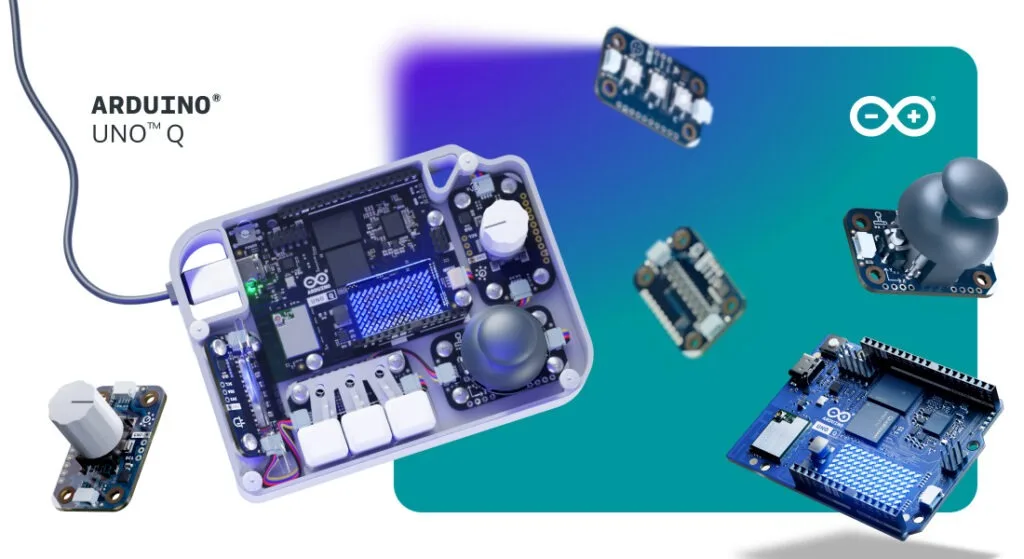
The UNO Q operates as a standalone single-board computer running Linux, but controlling its desktop environment need not rely on conventional input peripherals. Merging microcontroller capabilities with a full operating system opens possibilities for designing bespoke physical control systems—transforming buttons, rotary knobs, and joysticks into direct, hands-on interfaces for software applications.
To facilitate this approach, Arduino has unveiled the UNO Q SBC Controller Bundle, a package aimed at makers, students, and creative technologists. The offering combines hardware components, software tools, and instructional materials to guide builders through assembling a personalized control interface.
Bundle contents and components
The bundle centers on the dual-brain UNO Q 4GB board. Alongside it sits a selection of Arduino Modulino nodes—specifically Buttons, Joystick, Knob, and Pixels modules—that serve as input elements and provide visual feedback through the Pixels component.
These modules integrate via the Arduino App Lab development environment. For a polished, finished appearance, Arduino supplies a 3D-printable enclosure design that users can print directly or adapt to suit their specific requirements.
Physical controls for Linux applications
Running Linux natively on the development board unlocks diverse use cases. Whether managing Home Assistant interfaces locally, running retro gaming emulators, or executing edge-based AI tasks, physical controls offer an alternative interaction method with the operating system.
Constructing a custom controller provides practical experience in human-machine interaction design, demonstrating how physical inputs map to operating system functions. The modular Modulino architecture ensures flexibility—users can reassign input functions or substitute compatible modules as their projects develop. Step-by-step assembly guides are available through Arduino Project Hub for the included configuration.
Expanding your desktop configuration
Those building a complete desktop workstation around the UNO Q can add supplementary accessories. The Arduino USB-C Hub (8 in 1) provides HDMI connectivity, Ethernet, and additional USB ports. The official Arduino USB-C Power Supply (45W) and Arduino USB-C Cable (24 pin) deliver compatible power management for the UNO Q system.
The UNO Q SBC Controller Bundle is available through the Arduino Store, where users can also download the 3D-printable enclosure files and begin designing their own hardware control systems.
Source: Arduino Blog